
What Is Arceus X Neo?
Arceus X Neo is a modified Roblox client for Android, built by SPDM Team, that adds a full mod menu on top of the game. Instead of a separate launcher, the menu lives inside Roblox as an overlay: open the game, tap the floating button, and the Arceus X hub appears with your executor, your scripts and your settings, ready while you play.
The Neo release is the current generation of the long-running Arceus X line, rebuilt around the present-day Roblox client. That lineage matters in this niche: executors live or die by how quickly they track the base game, and Arceus X Neo is the build SPDM Team maintains for exactly that purpose. Everything you need is in one install, the game and the menu together, because the package is the Roblox client itself with the menu woven in.
This site is the download and documentation home for that build: a verified file, a plain-English tour of every screen, install steps that cover the signature clash most guides skip, and a reviewer who tests executors the way players use them, with real scripts in real games.
Arceus X Neo Features
Everything below is in the current Arceus X Neo build and was checked on our test phones, screen by screen.
- Mod menu overlay: a floating menu inside Roblox with sections for Player, Executor, Script Hub, Games Hub and Settings, usable without leaving your game.
- Script hub: a built-in library of ready-made scripts you can run in one tap, no hunting for code or pasting from random pages.
- Lua executor: a proper script executor with its own code editor, a saved script list and a console that shows output and errors.
- Arceus Hub home screen: quick sliders for gravity, jump power and walk speed, adjustable live while you play.
- Global functions: one-tap tools including Speed Hack, BTools, an anti-cheat bypass and FE Fling, with live status readouts in the menu.
- Games hub: per-game script collections for popular Roblox experiences, organised by the game you are actually in.
- Help assistant: an in-app help section for the common questions, plus settings to shape the menu to your phone.
Plenty of executors give you a text box and wish you luck. Arceus X Neo gives you a workshop: the hub for quick fun, the executor for real work, and the games hub for the scripts each community actually maintains.
Arceus X Neo Screenshots
This is the actual Arceus X Neo interface, captured from the real build: the menu sidebar (Player, Executor, Script Hub, Games Hub, Settings), the global functions panel, and the live status readout along the bottom.
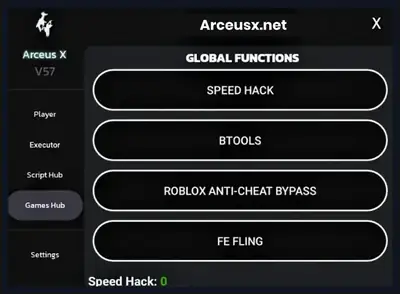

One real screenshot, shown as it is. The Neo menu is an overlay that lives inside your game, so its official channels publish a single clean UI frame: the Games Hub open on the global functions panel. Beside it is the app icon itself. We would rather show one honest screenshot and the real branding than pad this section with other tools or gameplay that is not the menu.
What's New in the Neo Build
The Neo generation of Arceus X Neo is a ground-up refresh rather than a patch: the menu was reorganised around the hub layout you see in the screenshot above, the executor gained its editor and console pairing, and the games hub became a first-class section instead of an afterthought.
For players, the practical news is stability work: the build tracks the current Roblox client, and SPDM Team's release rhythm follows the base game's updates, which is the only rhythm that matters for a modified client. The exact release name of the build we serve is shown in the APK details table above, and we re-test the file every time it changes, including a full run of the hub, the executor and the key flow.
How to Install Arceus X Neo APK
Installing Arceus X Neo has one step most guides skip, and it is the one that decides whether the install works at all. Read all four steps before you start.
- Handle the official Roblox app firstArceus X Neo is a modified Roblox client with the same package identity, so it cannot sit alongside the official app and cannot install over it. If Roblox is installed, back up anything you need and uninstall the official app first; your account, friends and progress live on Roblox's servers, not in the app.
- Download the fileUse the download button on this page, wait through the short countdown on the download page, and save the file. Confirm the size matches the APK details table above; a short file is a broken download.
- Allow the installOpen the file and, when Android asks, permit installs from your browser for this install. You can switch the permission back off afterwards.
- Launch and grant the overlayOpen the app, sign in to Roblox, and when the menu asks, allow the display-over-other-apps permission: the floating menu button needs it to appear inside the game. Then join any experience and tap the button to open the hub.
If the menu does not appear, the overlay permission is the first thing to check; the troubleshooting section below covers it and every other failure we have seen with Arceus X Neo installs.
Using the Menu: Hub, Executor and Games
The Arceus X Neo menu opens over your game and organises itself down the left side: Player, Executor, Script Hub, Games Hub and Settings. The home screen, the Arceus Hub, is built for speed: sliders for gravity, jump power and walk speed that apply the moment you move them, so you can feel a change mid-jump rather than after a reload.
The Executor is the workshop. Paste or write Lua in the editor, keep your regulars in the saved script list, execute, and read the console below for output and errors. It is a genuinely comfortable way to work on a phone, and the script hub complements it: a library of ready-made scripts for players who want results first and understanding second. Nothing stops you mixing both, running a hub script, then opening it in the editor to learn how it works.
The Games Hub is the community layer: script collections organised by experience, so the tools for the game you are standing in are one tap away instead of a web search away. Combined with the Player section's character tweaks and the global functions (speed, BTools, FE Fling and the anti-cheat bypass), Arceus X Neo covers the full range from casual fun to serious scripting in one overlay.
The Key System, Explained Honestly
Like most free executors, Arceus X Neo uses a key system: before the menu unlocks, the app asks for a key, and getting one involves completing a short sequence of checkpoint pages in your browser. Keys are time-limited, so when yours expires the app simply asks again. Annoying? A little. Normal for this niche? Completely.
Our practical advice, earned from doing this flow on every test device: use your regular browser, complete the steps in order without refreshing mid-sequence, and copy the key exactly, because one wrong character fails silently. Never pay anyone for a key and never download a key generator: keys for Arceus X Neo are free through the app's own flow, and anything sold or bundled elsewhere is a scam aimed at your account or your phone. The guides on this site walk the full flow with screenshots of each stage.
Safety and Verification
Every Arceus X Neo file on this page is checked before publication: package identity confirmed, file size matched to the table above, permissions audited (the overlay permission is legitimately required; contacts or messages requests would not be), and a full session driven on real phones, hub, executor, games hub and key flow included.
Two honest notes belong in any safety section for a tool like this. First, source discipline: modified clients are prime targets for fake re-uploads stuffed with junk, so take the file from a page that publishes its checks, like this one, and verify the size yourself. Second, account sense: any mod tool lives outside the base game's rules, and experienced players test new scripts on an alternate account before trusting them anywhere near a main. That is standard practice in the executor community, and our guides assume it.
Technical Details
Arceus X Neo is a full modified client, not a patch: the download is the size of the Roblox app itself plus the menu, which is why the file is substantially bigger than a typical utility. It needs Android 8.0 or newer (the minimum is in the details table) and enough free storage for the file plus the game's data.
Two permissions do the visible work. The overlay permission lets the menu float above the game; internet access is the game's own, since Roblox experiences are online by nature. The executor runs standard Lua scripts written for Roblox, and the console reports errors in plain text, which makes debugging on a phone far less painful than the blind trial-and-error of simpler tools. Because the client is modified, its updates follow the base game's: when Roblox updates, expect a fresh Arceus X Neo build to follow, and install it over your existing copy to keep your script library and settings.
Old Versions
Old Arceus X Neo builds have a shorter useful life than old versions of most apps, for a structural reason: the menu is woven into a specific Roblox client, and when the base game updates, older modified clients typically stop working properly or at all. Keeping an old build as a daily driver is therefore rarely practical.
This page always serves the current Neo build, with its release name in the APK details table. If you keep an older file for reference, treat it as an archive rather than an install candidate, and when a fresh build lands, install it over your existing copy: your saved scripts and settings carry across, and only the key flow needs a quick repeat.
Alternatives to Consider
The honest alternatives split by what you actually want. If you want Roblox exactly as its makers intend, the official app is the whole answer, and nothing on this page pretends otherwise. If you want scripting with a bigger screen and keyboard, playing on a computer with desktop tools suits long coding sessions better than any phone interface.
What Arceus X Neo owns is the middle ground most Android players actually live in: a maintained mod menu and executor, inside the game, on the phone in your pocket, with a script hub for instant fun and a games hub that follows the community. If that is the tool you came looking for, you are in the right place, and the guides below will take you from the key system to your first executed script.
Troubleshooting
Most Arceus X Neo problems have known causes and short fixes. These are the ones our readers hit most.
- The menu button never appears: the overlay permission is off. Grant display-over-other-apps for the app in Android settings, then relaunch the game.
- The install fails with a conflict: the official Roblox app is still installed. The modified client shares its package identity, so uninstall the official app first; your account is safe on Roblox's servers.
- Scripts stopped working after a Roblox update: the base game moved and the build must catch up. Install the current build from this page; executor breakage after client updates is normal and temporary.
- The key flow loops or the key is rejected: complete the checkpoints in one sitting without refreshing, and paste the key exactly. Expired keys simply need a fresh run through the flow.
- The game crashes on launch: check free storage first, then reinstall the verified file. A partial download is the usual culprit.
How to Update Arceus X Neo
Updating Arceus X Neo matters more than updating most apps, because the build must stay in step with the Roblox client it modifies. When a new Neo build appears here, download it and install it directly over your existing copy: the signature matches, your saved scripts and settings carry over, and only the key needs renewing when it next expires.
The trigger to watch is the base game. After a major Roblox update, give the developers a short window, then check this page: we re-test and refresh the file as soon as a working build exists, and the APK details table always names the release we currently serve. Sitting on an old build after the client has moved is the root cause of most executor problems readers write to us about.